# Adjust sensor chart colors to be easier to read
**URL:** https://community.beestat.io/t/adjust-sensor-chart-colors-to-be-easier-to-read/214
**Category:** Feature Requests
**Tags:** :settings
**Created:** [August 13, 2020, 10:21pm UTC](https://community.beestat.io/t/adjust-sensor-chart-colors-to-be-easier-to-read/214 "2020-08-13T22:21:57Z")
**Posts on this page:** 7
**Page:** 1
### Author:  [@dkgibson](https://community.beestat.io/u/dkgibson)
#### Post date: [August 13, 2020, 10:21pm UTC](https://community.beestat.io/t/adjust-sensor-chart-colors-to-be-easier-to-read/214/1 "2020-08-13T22:21:57Z")
I now have seven sensors, & on the sensor graph, the yellow (color #3) seems a bit too close to orange (color #5) to easily distinguish. Perhaps a little less red in the color?
---
### Author:  [@ziebelje](https://community.beestat.io/u/ziebelje)
#### Post date: [August 13, 2020, 11:28pm UTC](https://community.beestat.io/t/adjust-sensor-chart-colors-to-be-easier-to-read/214/2 "2020-08-13T23:28:02Z")
Yeah I can probably adjust things a bit. At some point there’s not much that can be done as everything will just run together regardless, but I don’t think it’s unreasonable to adjust some of the early colors for best contrast.
Here’s the current color sequence:

And here’s the official feature request:
>
>
> https://community.beestat.io/t/sensor-graph-colors/214
> I now have seven sensors, & on the sensor graph, the yellow seems a bit too close to orange to easily...
---
### Author:  [@dkgibson](https://community.beestat.io/u/dkgibson)
#### Post date: [August 14, 2020, 2:30am UTC](https://community.beestat.io/t/adjust-sensor-chart-colors-to-be-easier-to-read/214/3 "2020-08-14T02:30:32Z")
This is a very difficult task to do with the possibility of 32 sensors! One thing you could do, is allow the user to create groups of sensors, that a user could turn on & off with a single click, like you can currently do at the bottom of the graph for echo individual sensor. Each group would represent a collection of sensors (overlapping allowed) that he/she could enable or disable at a time, allowing easy comparisons of just a few sensors at a time.
And/or:
Since the sensor graph page has only one graph, use the above groups to create multiple graphs on that page.
---
### Author:  [@ziebelje](https://community.beestat.io/u/ziebelje)
#### Post date: [January 22, 2021, 12:14am UTC](https://community.beestat.io/t/adjust-sensor-chart-colors-to-be-easier-to-read/214/4 "2021-01-22T00:14:42Z")
Migrating a few comments from:
>
>
> https://community.beestat.io/t/sensor-graph-colors/214
> I now have seven sensors, & on the sensor graph, the yellow seems a bit too close to orange to easily...
### **[amabirts](https://github.com/amabirts)** commented [on Nov 2, 2020](https://github.com/beestat/app/issues/296#issuecomment-720814028)
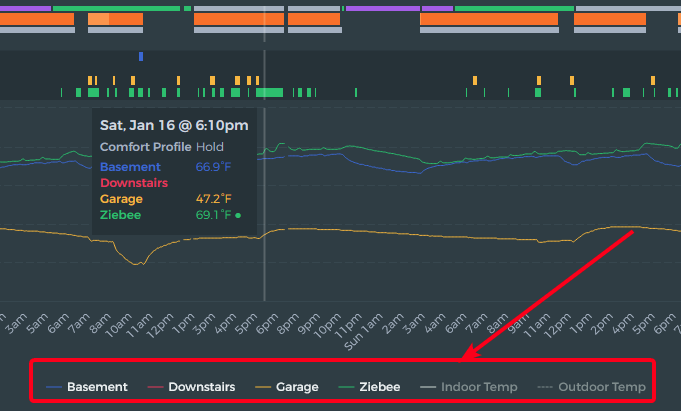
When viewing on the SENSOR tab, is there a way to have the sensor name the same colour as the sensor line/marks on the graph - rather than just white?
### **[amabirts](https://github.com/amabirts)** commented [3 days ago](https://github.com/beestat/app/issues/296#issuecomment-762395559)
I was thinking more along the way the floating box has the sensor name in the same colour as the line. Perhaps that could be mirrored with the key?
### **[ziebelje](https://github.com/ziebelje)** commented [3 days ago](https://github.com/beestat/app/issues/296#issuecomment-762398182)
I believe this is possible to do with the charting library I use. I’ll have to play around with it to see what can be done.
---
### Author:  [@dkgibson](https://community.beestat.io/u/dkgibson)
#### Post date: [June 26, 2021, 7:25pm UTC](https://community.beestat.io/t/adjust-sensor-chart-colors-to-be-easier-to-read/214/5 "2021-06-26T19:25:48Z")
I had previously ordered my sensor name prefix in the Ecobee app, so that the colors were assigned to the sensors in Beestat in a manner I liked (brighter colors for the warmer rooms).
I recently renamed the thermostat, & that effectively re-ordered the colors for the sensors recently. Accordingly, I have renamed my sensor names (& moved the sensors around in my house) so that I retained the color scheme I liked for my rooms.
Suggestions:
1. Provide an easy way to set color preferences (requires quite a bit of work, I realize).
2. Show the colors for the sensors in the sensor listing at the top (easy).
---
### Author:  [@222fbj](https://community.beestat.io/u/222fbj)
#### Post date: [December 25, 2021, 4:00pm UTC](https://community.beestat.io/t/adjust-sensor-chart-colors-to-be-easier-to-read/214/6 "2021-12-25T16:00:13Z")
Re color scheme adjustments… pls consider a white background - to help with printing a screen capture. Large areas of dark colors don’t print well.
I only want to print occassionally - and can use a marker to highlight the data/plots.
My printer is laser so no color anyway.
Thank You
---
### Author:  [@ziebelje](https://community.beestat.io/u/ziebelje)
#### Post date: [October 22, 2022, 12:11pm UTC](https://community.beestat.io/t/adjust-sensor-chart-colors-to-be-easier-to-read/214/7 "2022-10-22T12:11:28Z")
Received request to customize chart colors as well. Merging that with this request. Eventually this will be a user-configurable setting.
>
>
> \*\*Describe the bug\*\*
> I have a 2 stage AUX heat. Beestat show AUX and AUX2 as sa…me color (Similar RED). It should show AUX2 in more different color.
>
> \*\*Screenshots\*\*
>
> !\[image\](https://user-images.githubusercontent.com/76497238/196774822-58f1cf88-32bf-4f5a-8358-bf4fbcb90344.png)
>
> !\[image\](https://user-images.githubusercontent.com/76497238/196775011-e614faa7-3f9e-4634-bbef-ffc3122de545.png)