# Highlight weekends (or other intervals) on charts
**URL:** https://community.beestat.io/t/highlight-weekends-or-other-intervals-on-charts/19
**Category:** Feature Requests
**Tags:** :detail
**Created:** [March 2, 2020, 2:09pm UTC](https://community.beestat.io/t/highlight-weekends-or-other-intervals-on-charts/19 "2020-03-02T14:09:40Z")
**Posts on this page:** 13
**Page:** 1
### Author:  [@tibble](https://community.beestat.io/u/tibble)
#### Post date: [March 2, 2020, 2:09pm UTC](https://community.beestat.io/t/highlight-weekends-or-other-intervals-on-charts/19/1 "2020-03-02T14:09:40Z")
I posted this to [github](https://github.com/beestat/app/issues/219) before but am recreating it here for possible discussion.
In the Thermostat Summary chart I would like to see weekend dates highlighted similar to how they are in the Ecobee Weather Impact graph.
I also thought beestat could go one step further, since not everyone’s schedules are the same and they may not be home on the weekends and at work during weekdays. I propose highlighting days where the Away profile was on more than the other days. This could either be figured out automatically, or be a setting such as \> X hours away per day = a non-highlighted ‘work’ day. Any day with the Away profile active for less than that setting out be highlighted as a day your usage would be higher than normal due to being home more.
Thoughts?
---
### Author:  [@vin](https://community.beestat.io/u/vin)
#### Post date: [March 2, 2020, 5:29pm UTC](https://community.beestat.io/t/highlight-weekends-or-other-intervals-on-charts/19/2 "2020-03-02T17:29:08Z")
I like it - this idea could be part of a new metric
I also created a github issue to see if Ecobee/Beestat is able to determine Away vs Home via the Comfort Profile. It might not be possible when an automation (Homekit or HomeAssistant) sets the Ecobee away: [https://github.com/beestat/app/issues/258](https://github.com/beestat/app/issues/258)
---
### Author:  [@tibble](https://community.beestat.io/u/tibble)
#### Post date: [March 2, 2020, 5:45pm UTC](https://community.beestat.io/t/highlight-weekends-or-other-intervals-on-charts/19/3 "2020-03-02T17:45:25Z")
I hadn’t noticed that. Maybe it will have to match based on the Away temperature? Does sound messy.
---
### Author:  [@ziebelje](https://community.beestat.io/u/ziebelje)
#### Post date: [March 2, 2020, 5:48pm UTC](https://community.beestat.io/t/highlight-weekends-or-other-intervals-on-charts/19/4 "2020-03-02T17:48:57Z")
I can highlight weekends, but I always pause because one person may want weekends, another person may want Wednesdays, and another person may want November-March for some winter home.
Instead of picking some arbitrary thing to highlight, I look for the desired analysis. In this case it’s analyzing runtime vs comfort profile.
Knowing that, it’s the challenge of coming up with something that can accurately represent that. And how do you handle situations where the “home” comfort profile is usually at night, and the “away” comfort profile is usually during the day. Runtime during “away” will typically increase simply due to the average increased outdoor temperature.
It’s tricky to pull out only the one thing we care about, especially with runtime, because there are many other factors that need to be accounted for.
> [@vin](#):
>
> I like it - this idea could be part of a new metric
I want to be cautious with metrics…they can be a really great tool but metrics at this point are designed with home comparisons in mind. This specific situation doesn’t really fit into that box. Might be something similar, though. There are lots of little things like this that don’t really need their own huge chart, but would be interesting to see and possibly compare to yourself month over month.
---
### Author:  [@tibble](https://community.beestat.io/u/tibble)
#### Post date: [March 2, 2020, 5:51pm UTC](https://community.beestat.io/t/highlight-weekends-or-other-intervals-on-charts/19/5 "2020-03-02T17:51:52Z")
I think the quickest, easiest, helpful for most people option would just be to implement something similar to the ecobee date highlight for weekends. I would love to figure out something better and more accurate, but this would likely help the majority of people with the least effort

---
### Author:  [@buffaloseven](https://community.beestat.io/u/buffaloseven)
#### Post date: [March 2, 2020, 6:59pm UTC](https://community.beestat.io/t/highlight-weekends-or-other-intervals-on-charts/19/6 "2020-03-02T18:59:34Z")
It’s an interesting idea, but also totally irrelevant to someone who like me who does non-static shift work and weekends are sort of a meaningless construct.
I agree with @ziebelje that if it’s done, it’s probably best to figure out the flexible answer that allows for highlighting based on a variety of user needs. As he mentioned, though, that’s a tricky design problem.
I’m not _against_ highlighting weekends, just that it would be lower down on my personal wish list than some of the other things being worked on.
---
### Author:  [@tibble](https://community.beestat.io/u/tibble)
#### Post date: [April 17, 2020, 5:39pm UTC](https://community.beestat.io/t/highlight-weekends-or-other-intervals-on-charts/19/7 "2020-04-17T17:39:39Z")
I just thought about this request and chuckled. Glad you didn’t spend any time on it! 😉
---
### Author:  [@dkgibson](https://community.beestat.io/u/dkgibson)
#### Post date: [August 4, 2020, 7:44pm UTC](https://community.beestat.io/t/highlight-weekends-or-other-intervals-on-charts/19/8 "2020-08-04T19:44:29Z")
Actually, delineating days would be useful: Alternate day shading, or a thin vertical line (my preference).
---
### Author:  [@dkgibson](https://community.beestat.io/u/dkgibson)
#### Post date: [August 15, 2020, 9:03pm UTC](https://community.beestat.io/t/highlight-weekends-or-other-intervals-on-charts/19/9 "2020-08-15T21:03:54Z")
Even better, would be to make the dark gray background of the graphs, shaded slightly brighter during daylight hours (assuming you presumably can get the location from API???).
---
### Author:  [@ziebelje](https://community.beestat.io/u/ziebelje)
#### Post date: [August 19, 2020, 11:10pm UTC](https://community.beestat.io/t/highlight-weekends-or-other-intervals-on-charts/19/10 "2020-08-19T23:10:46Z")
You might have to get me a visual on that one. That wouldn’t be applicable on the Runtime Summary chart as that’s limited to one column per day. The Sensor & Thermostat Detail charts would support something like this.
I always like coming up with intuitive visual ways to help people visualize data. Just looking at a bunch of numbers along the bottom of a chart isn’t always easy.
---
### Author:  [@dkgibson](https://community.beestat.io/u/dkgibson)
#### Post date: [September 11, 2020, 5:31pm UTC](https://community.beestat.io/t/highlight-weekends-or-other-intervals-on-charts/19/11 "2020-09-11T17:31:48Z")
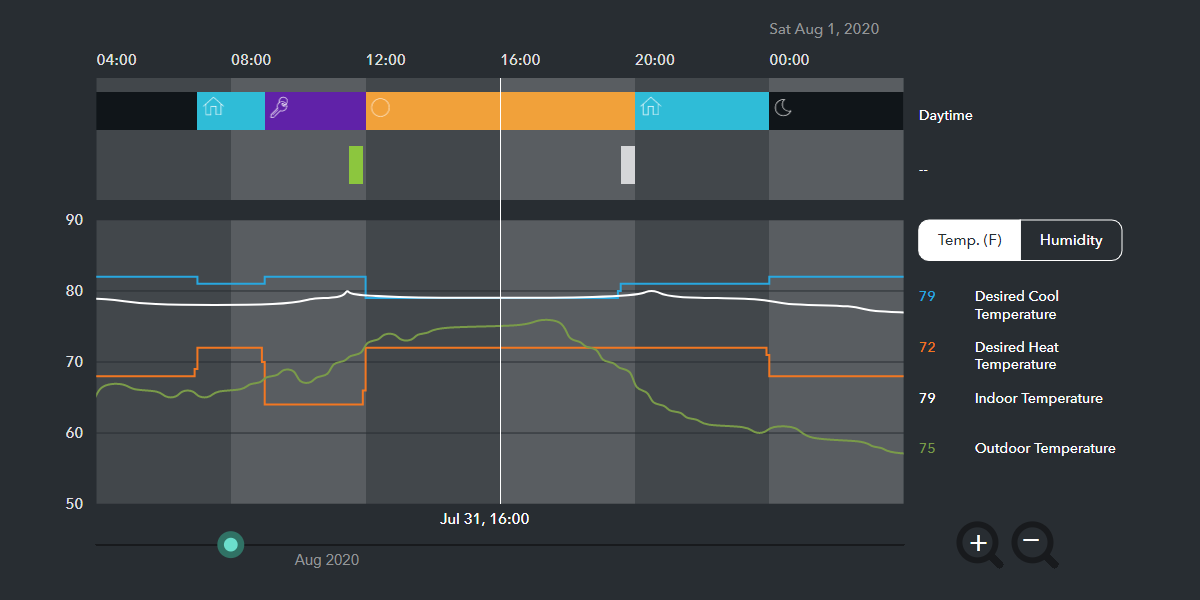
Here’s a visual, from the way Ecobee does it (four hours at a time, unless you zoom in). You could do it either alternating by day, or by sunrise/sunset.
---
### Author:  [@das1996](https://community.beestat.io/u/das1996)
#### Post date: [December 17, 2022, 6:30pm UTC](https://community.beestat.io/t/highlight-weekends-or-other-intervals-on-charts/19/12 "2022-12-17T18:30:20Z")
Graph would be easier to read if there were thin vertical lines at hear hour for thermostat and sensor detail.
More clearly distinguish cycles per hour.
This of course would only be on the single day views. For multiple days (say up to 7), vertical lines separating days would help.
---
### Author:  [@ziebelje](https://community.beestat.io/u/ziebelje)
#### Post date: [December 23, 2022, 1:56pm UTC](https://community.beestat.io/t/highlight-weekends-or-other-intervals-on-charts/19/13 "2022-12-23T13:56:59Z")
This is a great idea! I’ll be spending some time on smaller requests like this over the next couple months so I will look at adding.