# Manually Applied Comfort Profile Not Reported
**URL:** https://community.beestat.io/t/manually-applied-comfort-profile-not-reported/1499
**Category:** Bug Reports
**Created:** [June 26, 2025, 5:14pm UTC](https://community.beestat.io/t/manually-applied-comfort-profile-not-reported/1499 "2025-06-26T17:14:41Z")
**Posts on this page:** 2
**Page:** 1
### Author:  [@kas](https://community.beestat.io/u/kas)
#### Post date: [June 26, 2025, 5:14pm UTC](https://community.beestat.io/t/manually-applied-comfort-profile-not-reported/1499/1 "2025-06-26T17:14:41Z")
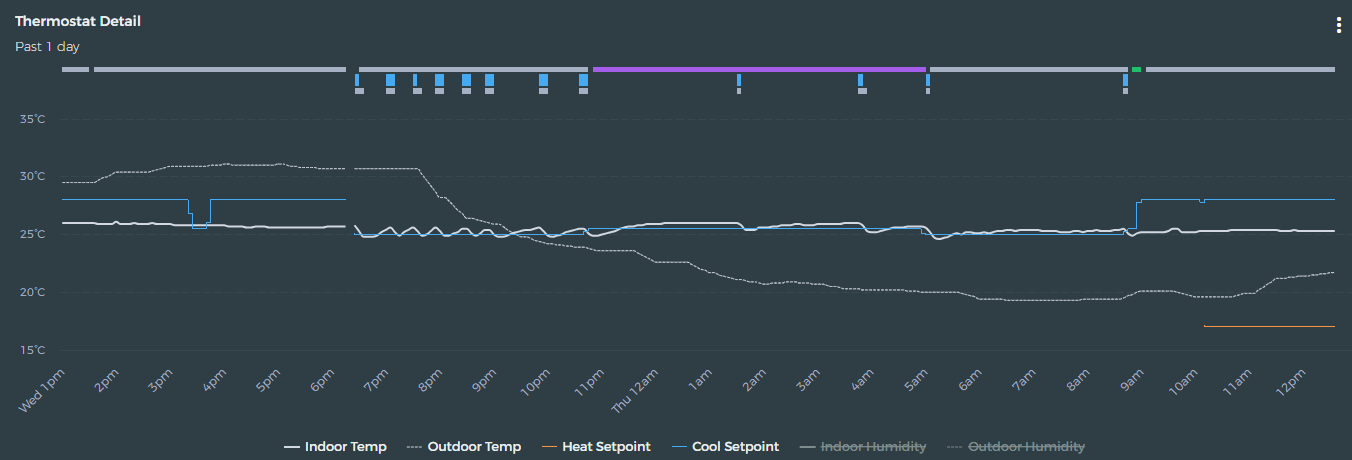
I have observed that comfort profiles applied ad-hoc manually (in this case via Home Assistant), do not appear in Beestat. I can only see comfort profiles that are applied by the schedule.
I have validated that Ecobee’s cloud can see the comfort profile correctly once set.
---
### Author:  [@2way](https://community.beestat.io/u/2way)
#### Post date: [June 27, 2025, 5:17pm UTC](https://community.beestat.io/t/manually-applied-comfort-profile-not-reported/1499/2 "2025-06-27T17:17:18Z")
I certainly see the changes. If you scroll along the graph, you should be able to read the changes. Or, are you referring to a specifically named custom profile?