# No Outdoor Temp Graph
**URL:** https://community.beestat.io/t/no-outdoor-temp-graph/573
**Category:** Bug Reports
**Created:** [November 13, 2021, 1:42pm UTC](https://community.beestat.io/t/no-outdoor-temp-graph/573 "2021-11-13T13:42:53Z")
**Posts on this page:** 12
**Page:** 1
### Author:  [@Meatwell](https://community.beestat.io/u/Meatwell)
#### Post date: [November 13, 2021, 1:42pm UTC](https://community.beestat.io/t/no-outdoor-temp-graph/573/1 "2021-11-13T13:42:53Z")
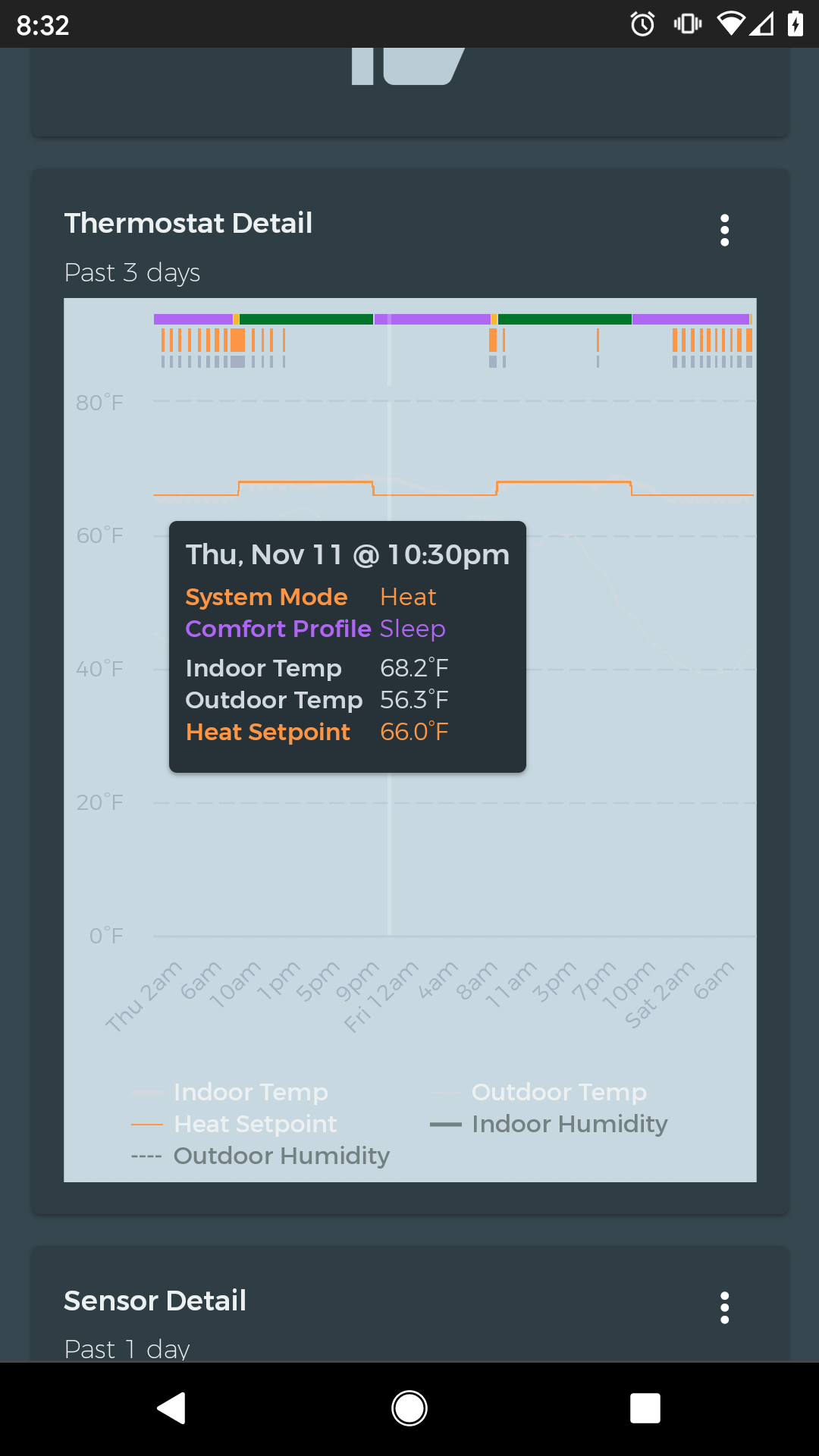
It is certainly possible that it’s user error, but I cannot see the outdoor temperature graph on Android or using my computers browser. The outdoor temp value does appear in the chart window when I select it to be displayed, and when I deaslect it the axis adjust around the displayable data, so the data is there, but I just can’t see the line? Please see the attached screenshot.
Additionally, is it possible to change the colors? Indoor temperature is nearly impossible to see!
---
### Author:  [@Meatwell](https://community.beestat.io/u/Meatwell)
#### Post date: [November 15, 2021, 3:20pm UTC](https://community.beestat.io/t/no-outdoor-temp-graph/573/2 "2021-11-15T15:20:42Z")
Ok, update, I CAN see outdoor temperature on my desktop in a browser; I was certain I could no earlier, but I’ll chalk it up to use error. On my Android (Pixel 2 rubbing Android 11) I definitely do not see the outdoor line. A noted difference between Android and a PC browser is the chart background is a light grey on Android and a dark grey on PC. I’m willing to bet that the Outdoor Temp color is the light grey which is the chart background when viewing in Android? I thought it might be because I have Dark Mode enabled, but turning the system setting off had no effect on any colors in the app.
---
### Author:  [@ziebelje](https://community.beestat.io/u/ziebelje)
#### Post date: [November 20, 2021, 2:04pm UTC](https://community.beestat.io/t/no-outdoor-temp-graph/573/3 "2021-11-20T14:04:13Z")
Thanks for the report! The chart should definitely not have that gray background color. I’ve had issues in the past with [dark mode affecting beestat](https://github.com/beestat/app/issues/179), so I’ll do some investigation.
---
### Author:  [@Meatwell](https://community.beestat.io/u/Meatwell)
#### Post date: [January 18, 2022, 11:27pm UTC](https://community.beestat.io/t/no-outdoor-temp-graph/573/4 "2022-01-18T23:27:50Z")
@ziebelje I figured it out - I use Brave browser which has an ‘experimental’ Night View option which basically turns all the white to black and black to white and since Beestat is a webapp, that’s why it was making the charts look extra weird. Setting my default browser to Chrome or disabling Brace’s Night View makes the charts appear correct.
---
### Author:  [@ziebelje](https://community.beestat.io/u/ziebelje)
#### Post date: [January 19, 2022, 1:14am UTC](https://community.beestat.io/t/no-outdoor-temp-graph/573/5 "2022-01-19T01:14:21Z")
Forgot about this one. Night/dark mode toggles are nice except when the site is already in that mode. Wonder if there’s a way to indicate to the browser so it doesn’t try to change it.
---
### Author:  [@nwetter](https://community.beestat.io/u/nwetter)
#### Post date: [January 19, 2022, 4:55pm UTC](https://community.beestat.io/t/no-outdoor-temp-graph/573/6 "2022-01-19T16:55:04Z")
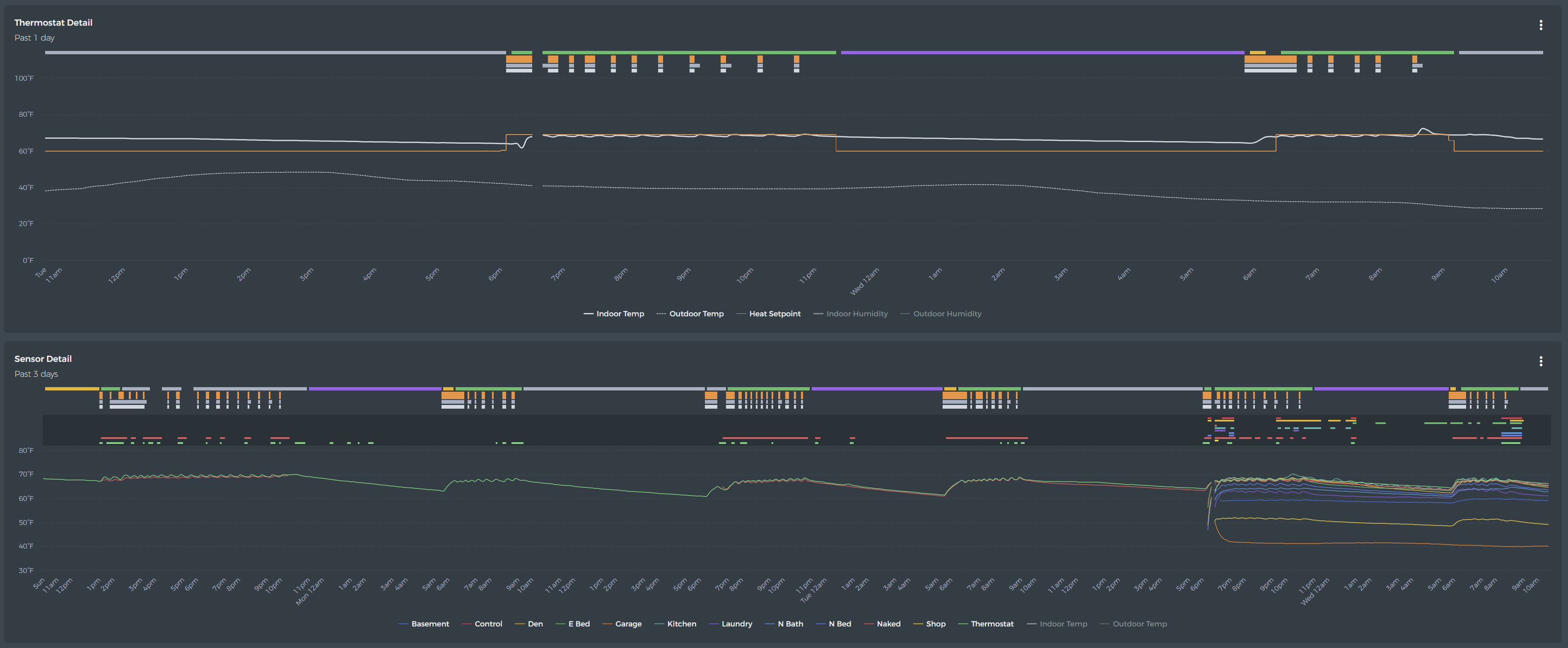
I see outdoor temp on the thermostat detail but not on the sensor detail. I don’t see indoor or outdoor humidity anywhere.
---
### Author:  [@ziebelje](https://community.beestat.io/u/ziebelje)
#### Post date: [April 7, 2022, 6:15pm UTC](https://community.beestat.io/t/no-outdoor-temp-graph/573/7 "2022-04-07T18:15:34Z")
Outdoor temperature is available, but disabled on the Sensor Detail chart by default. To enable it, click the “Outdoor Temp” in the legend at the bottom to toggle it on.
Same thing with humidity, but that’s only available on the Thermostat Detail chart.
---
### Author:  [@dkgibson](https://community.beestat.io/u/dkgibson)
#### Post date: [September 26, 2023, 5:36pm UTC](https://community.beestat.io/t/no-outdoor-temp-graph/573/8 "2023-09-26T17:36:29Z")
What order are the sensors in the Sensor Detail legend? They aren’t in Ecobee’s order in their “Follow Me” graph, & they aren’t in alphabetical order (at least after I make changes to the sensor names).
It would be nice if the sensors were in alphabetical order in the legend, since you sort them in alphabetical order in the list at the top of the page.
---
### Author:  [@ziebelje](https://community.beestat.io/u/ziebelje)
#### Post date: [October 1, 2023, 2:30pm UTC](https://community.beestat.io/t/no-outdoor-temp-graph/573/9 "2023-10-01T14:30:13Z")
I think at some point they were supposed to sort to match the Sensors card…pushed a fix. 🙂
---
### Author:  [@dkgibson](https://community.beestat.io/u/dkgibson)
#### Post date: [October 1, 2023, 4:06pm UTC](https://community.beestat.io/t/no-outdoor-temp-graph/573/10 "2023-10-01T16:06:55Z")
THANK YOU **VERY, VERY MUCH**!
(Donation subscription created)
---
### Author:  [@ziebelje](https://community.beestat.io/u/ziebelje)
#### Post date: [October 6, 2023, 12:07am UTC](https://community.beestat.io/t/no-outdoor-temp-graph/573/11 "2023-10-06T00:07:49Z")
Happy to help and thank you so much for the support!
---
### Author:  [@ziebelje](https://community.beestat.io/u/ziebelje)
#### Post date: [December 15, 2023, 12:59pm UTC](https://community.beestat.io/t/no-outdoor-temp-graph/573/12 "2023-12-15T12:59:23Z")