# Reboot history - logs
**URL:** https://community.beestat.io/t/reboot-history-logs/1121
**Category:** Feedback & Discussion
**Created:** [March 18, 2024, 8:41pm UTC](https://community.beestat.io/t/reboot-history-logs/1121 "2024-03-18T20:41:52Z")
**Posts on this page:** 2
**Page:** 1
### Author:  [@wagging\_tail](https://community.beestat.io/u/wagging_tail)
#### Post date: [March 18, 2024, 8:41pm UTC](https://community.beestat.io/t/reboot-history-logs/1121/1 "2024-03-18T20:41:52Z")
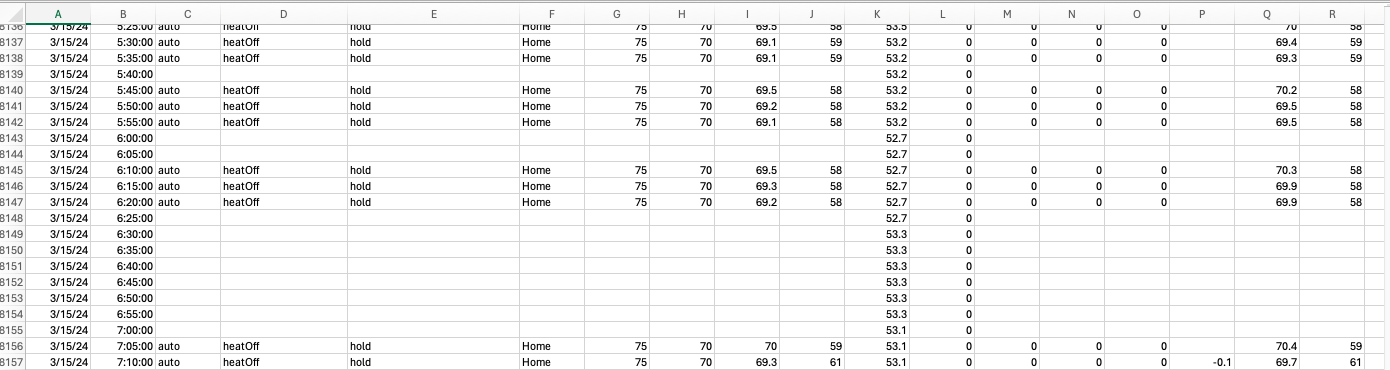
Hello - I’m trying to find the history of reboot for my Ecobee. I know I can on the thermostat itself because it’s a history of notifications. So my question is how do I see when my ecobee is “rebooting” and is going offline the same as “rebooting”? In my logs I see multiple block with no info. Is this indicative of a reboot?
---
### Author:  [@ziebelje](https://community.beestat.io/u/ziebelje)
#### Post date: [April 3, 2024, 12:19am UTC](https://community.beestat.io/t/reboot-history-logs/1121/2 "2024-04-03T00:19:10Z")
Generally yes, if you have a chunk of time with no data your ecobee may have rebooted during that time. It could have also disconnected from WiFi, but a reboot is the most common situation here.