# Sensor plot not matching actual indoor temp
**URL:** https://community.beestat.io/t/sensor-plot-not-matching-actual-indoor-temp/88
**Category:** Bug Reports
**Created:** [March 11, 2020, 8:52pm UTC](https://community.beestat.io/t/sensor-plot-not-matching-actual-indoor-temp/88 "2020-03-11T20:52:50Z")
**Posts on this page:** 10
**Page:** 1
### Author:  [@icepop456](https://community.beestat.io/u/icepop456)
#### Post date: [March 11, 2020, 8:52pm UTC](https://community.beestat.io/t/sensor-plot-not-matching-actual-indoor-temp/88/1 "2020-03-11T20:52:50Z")
I just noticed that at around 5pm (East Coast US) on 3/10, my indoor temperature plot is no longer matching any of my sensors. I actually can’t seem to figure out what it is aligned to as it is greater than all sensors on my thermostat.
---
### Author:  [@ziebelje](https://community.beestat.io/u/ziebelje)
#### Post date: [March 11, 2020, 10:32pm UTC](https://community.beestat.io/t/sensor-plot-not-matching-actual-indoor-temp/88/2 "2020-03-11T22:32:32Z")
Could you post a screenshot of your Thermostat Detail and Sensor Detail charts for the same time period? That will help. You might also open up the ecobee Home IQ website and see if that shows the same thing as beestat.
Normally I’d say there’s just some sensor averaging going on, but if your indoor temperature is higher than any of your sensors then that doesn’t quite fit.
---
### Author:  [@icepop456](https://community.beestat.io/u/icepop456)
#### Post date: [March 12, 2020, 2:24pm UTC](https://community.beestat.io/t/sensor-plot-not-matching-actual-indoor-temp/88/3 "2020-03-12T14:24:28Z")
NOTE: Home IQ generally shows the same thing as the Indoor temperature, but I can’t find any details on sensor data to compare to.
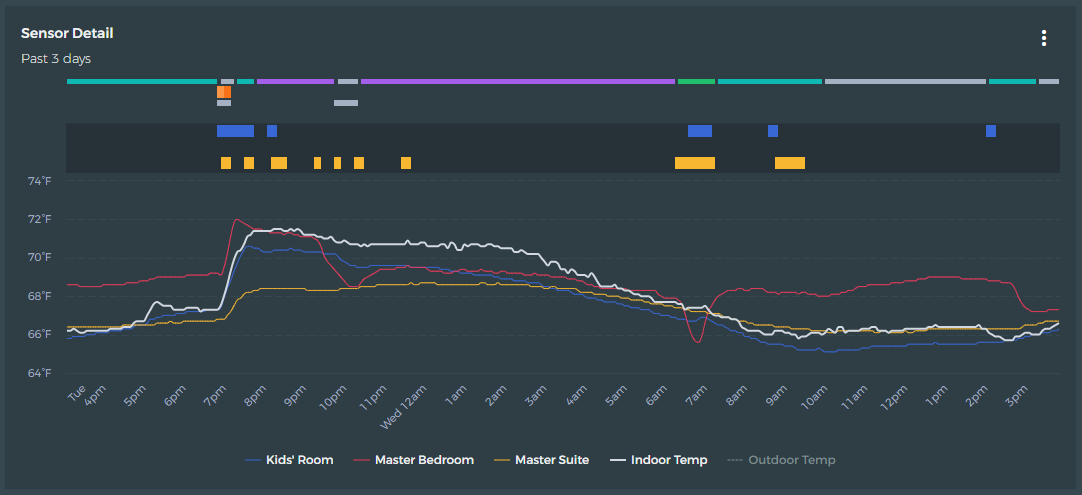
My upstairs has its own heat/cool forced air unit. I mainly have the ecobee3 lite regulated based on the “Kids Room” temperature (blue). The thermostat itself is “Master Bedroom” in Red and suffers from self heating and draft changes when the 1st floor unit turns on (not shown). The Yellow signal is a sensor in the same room as the thermostat.
Something odd happens at 5pm and then goes back to normal at a profle change at 2pm the following day.
---
### Author:  [@icepop456](https://community.beestat.io/u/icepop456)
#### Post date: [March 12, 2020, 2:26pm UTC](https://community.beestat.io/t/sensor-plot-not-matching-actual-indoor-temp/88/4 "2020-03-12T14:26:03Z")
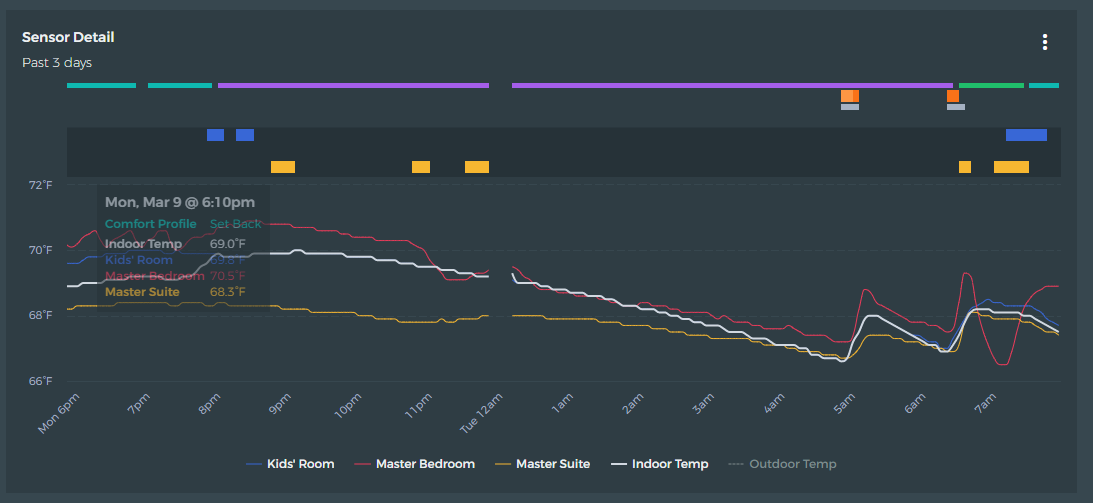
Here is a view from the previous night where you can see the indoor temperature and the kids room match during my sleep comfort profile. At around 630am the wake up profile becomes the average of the master bedroom suite + kids room to help me get out of bed. This is all expected (except the missing data piece but that doesn’t bother me at all)
---
### Author:  [@ziebelje](https://community.beestat.io/u/ziebelje)
#### Post date: [March 17, 2020, 11:46am UTC](https://community.beestat.io/t/sensor-plot-not-matching-actual-indoor-temp/88/5 "2020-03-17T11:46:17Z")
Sorry for the delay on this; finally getting back to some of these issues. The first thing I think we need to do here is see what data ecobee has. Could you upload a CSV export of your ecobee data for the affected time period? This will show us all of the sensor temperatures as reported by ecobee.
I need to validate that it’s not a sync issue first. Once we establish that, then we can try and figure out why.
---
### Author:  [@icepop456](https://community.beestat.io/u/icepop456)
#### Post date: [April 13, 2020, 4:30pm UTC](https://community.beestat.io/t/sensor-plot-not-matching-actual-indoor-temp/88/6 "2020-04-13T16:30:58Z")
Hi Jon,
I think I figured out the root cause. When I pulled my data, I noticed that the “indoor temperature” a function of both the proper sensor (i.e., kid’s room) and the DM Offset. That is, indoor temp = (kid’s room) - (DM Offset).
Today, I got a some sort of ECO+ message on that thermostat saying it was using humidity to make it feel warmer (I believe). I was dumb and disabled whatever option it had up before studying it. That said, that got me thinking. It looks like DM offset is the variable used by ECO+ to create the “feel like” temperature. My sensor data error matches nicely with indoor humidity.
The only issue with this is that my ECO+ is completely disabled. Clearly that is not 100% true regardless of the settings. Why would it prompt me about humidity and heat usage? Why would DM Offset be anything other than 0 since I do not have any utility associations/programs to reduce load (which usually is AC anyway - still using heat here)
NOTE: No way to attach CSV file from what I can tell.
---
### Author:  [@icepop456](https://community.beestat.io/u/icepop456)
#### Post date: [April 14, 2020, 1:39am UTC](https://community.beestat.io/t/sensor-plot-not-matching-actual-indoor-temp/88/7 "2020-04-14T01:39:45Z")
Plot showing what happens when ECO+ Feels Like is actually disabled. Took a few tries later this evening where I would enable ECO+ and then manually disable each item. Then re-disable ECO+ completely. Fixed both of my Ecobee3 Lites.
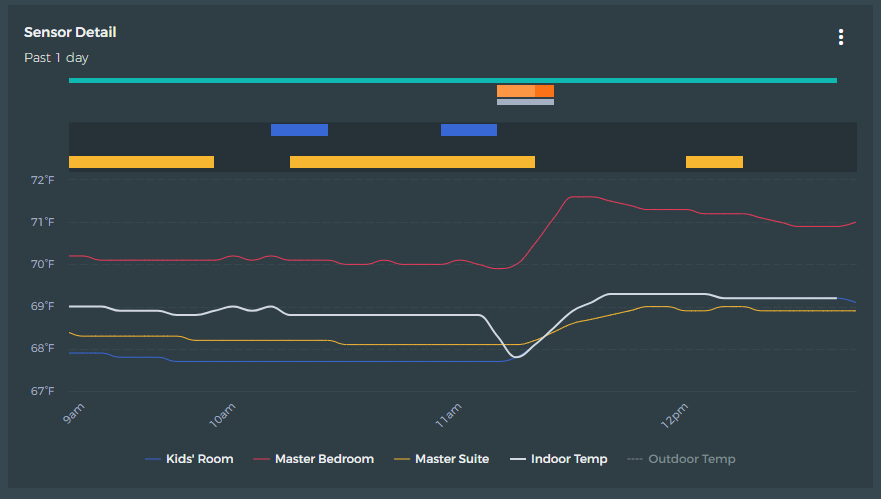
Fixed at 11:10 am
---
### Author:  [@ziebelje](https://community.beestat.io/u/ziebelje)
#### Post date: [April 16, 2020, 12:34am UTC](https://community.beestat.io/t/sensor-plot-not-matching-actual-indoor-temp/88/8 "2020-04-16T00:34:36Z")
So you’re saying that, for some reason, ecobee was artificially inflating your indoor temperature by setting the `DM Offset`?
Ex: It was actually 70°F, but your thermostat said 72°F. (With a DM Offset value of 2°F).
The ecobee documentation says that the DM Offset values are an “adjustment to the thermostat **desired** temperature”. Additionally, the eco+ description in the app says “eco+ adjusts your **set points** based on humidity…”
Both of those seem to indicate that the set points are changed, not the actual reported temperature. But in your last screenshot it’s clear that the indoor temperature syncs back up to the sensor temperature as soon as eco+ was disabled. Could you send the CSV of that time range to me in a PM or to [contact@beestat.io](mailto:contact@beestat.io). I’m curious to know what is driving this.
---
### Author:  [@Aaron](https://community.beestat.io/u/Aaron)
#### Post date: [May 26, 2024, 1:51pm UTC](https://community.beestat.io/t/sensor-plot-not-matching-actual-indoor-temp/88/9 "2024-05-26T13:51:04Z")
I wanted to revisit this thread regarding the Sensor Tile not reporting the actual Temperature but rather the Temperature after applying the Eco+ adjusted temperatures (DM Offset). It is correctly reported on the Sensor Detail graph. Is there any way to have an option to report the “actual” temperatures in the Sensor Tile at the top? It seems like the data is all there in the sync as it correctly shows in the Sensor Graph.
Thanks,
---
### Author:  [@Adamjcyr](https://community.beestat.io/u/Adamjcyr)
#### Post date: [October 23, 2025, 3:06am UTC](https://community.beestat.io/t/sensor-plot-not-matching-actual-indoor-temp/88/10 "2025-10-23T03:06:44Z")
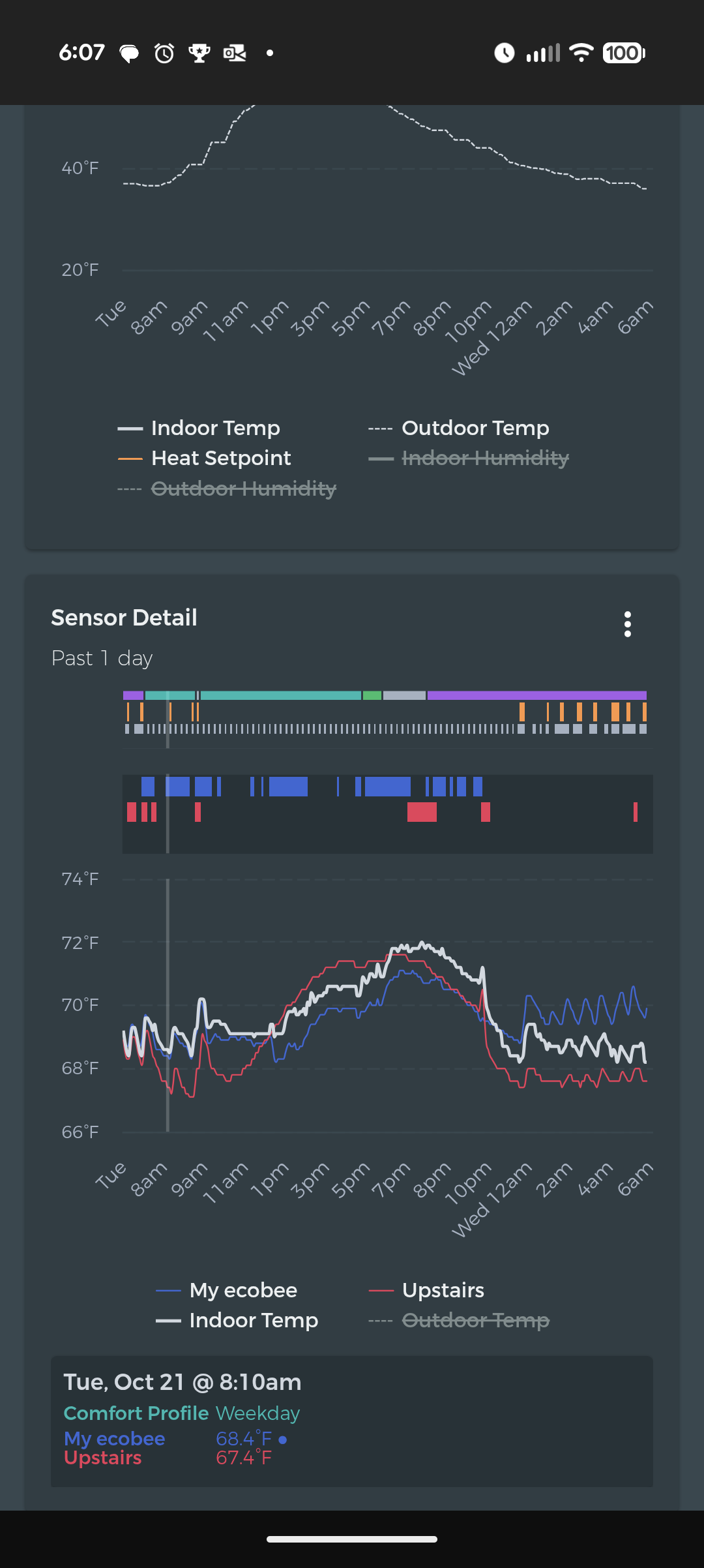
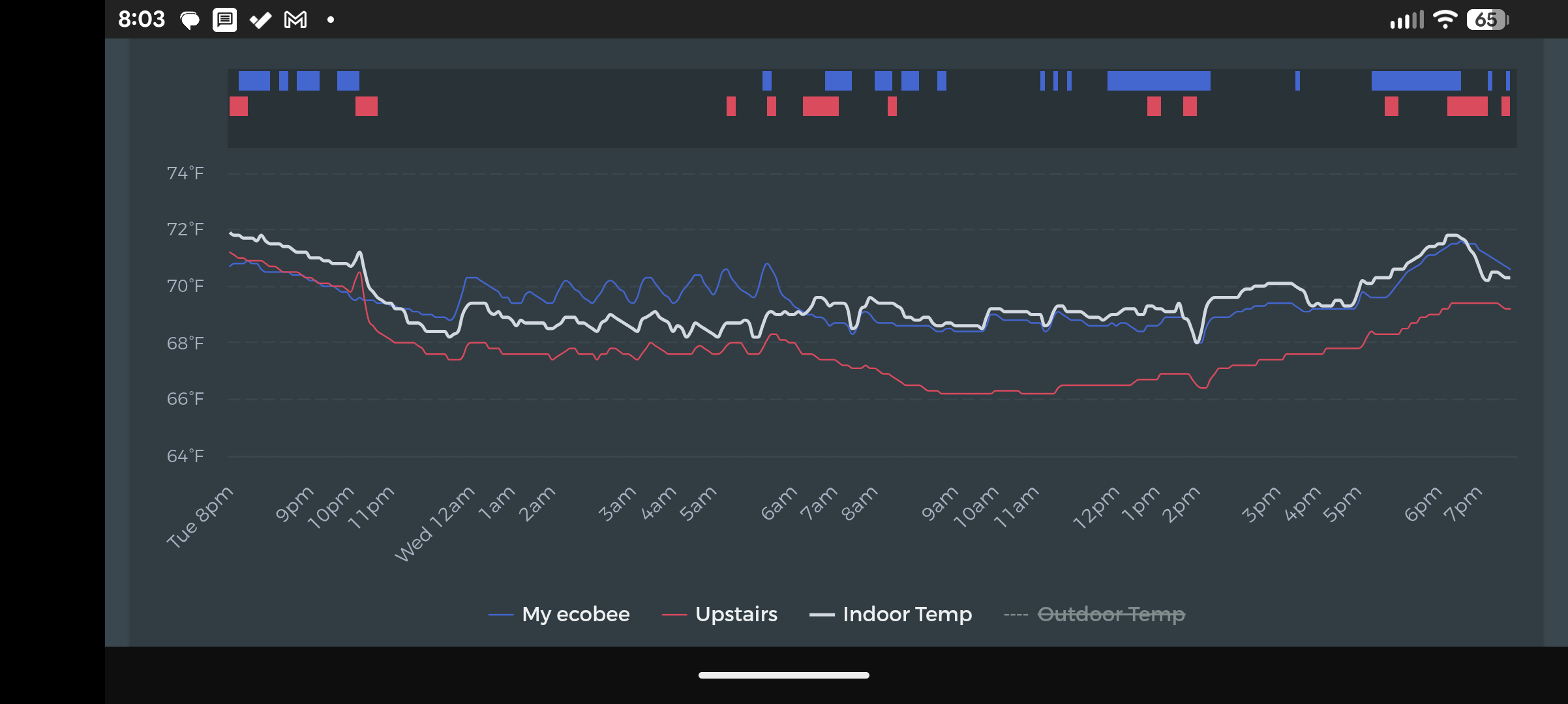
I sent an email but found this old post, so figured I’d drop here as well. I have a similar problem. I too recently set a 2F offset after seeing a discrepancy between by upstairs sensor and main thermostat. Now, it seems the “indoor temp” tracks something like an average at time, and at others something completely different. In any comfort setting, I’m only relying on one of the sensors (either upstairs or the thermostat), so it shouldn’t be averaging. And still, the indoor temp isn’t exactly 2F off from the thermostat.