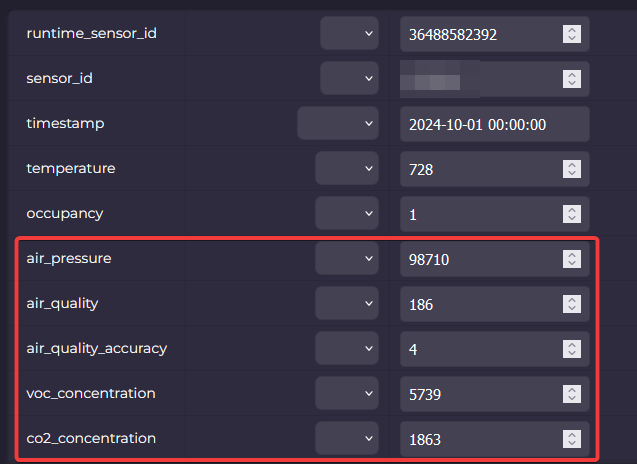
Im new to API’s. I was looking at the Beestat API’s and i didnt see one for the IAQ feature on the ecobee thermostat. Is that an option? id like to control my fresh air damper off of that.
Rob
Im new to API’s. I was looking at the Beestat API’s and i didnt see one for the IAQ feature on the ecobee thermostat. Is that an option? id like to control my fresh air damper off of that.
Rob
The air quality information is part of the sensors API. You’ll use runtime_sensor.read to access the data.
ok I think I have it working. although the sensor details for the IAQ all say unknown? Im using node red to send and receive the response if thats needed.
{“id”:“4”,“type”:“airQualityAccuracy”,“value”:“unknown”},{“id”:“5”,“type”:“airQuality”,“value”:“unknown”},{“id”:“6”,“type”:“vocPPM”,“value”:“unknown”},
What API call did you run to get that output? If you do something like this:
https://api.beestat.io/?api_key={YOUR API KEY}&resource=runtime_sensor&method=read&arguments={“attributes”:{“sensor_id”:{YOUR SENSOR ID},“timestamp”:{“value”:“2025-01-01 00:00:00”,“operator”:“>”}}}
You should get an array of rows that looks like this:
i used this one.
https://api.beestat.io/?api_key={YOUR API KEY}&resource=thermostat&method=read_id
obviously id put in my api key. some of the other info that comes back is strange as well
ok I’ve got it working now. how often can send an API request?
I think the limit is 30 requests per minute or something absurd. If you break it the API will tell you.
ok thats way more than i want to do lol also another question. is there a way in the api to show if the system is in stage one or two and actively running? i was looking at the response and i didnt see anything
The easiest way is to do a thermostat.read API call (not ecobee_thermostat.read) and use the running_equipment column.
You can also get it from ecobee_thermostat.equipment_status although that is less normalized as it’s the raw data from ecobee.
thanks for your help. ive run into another interesting thing. ive been using the api to request some data like the outdoor temp and humidity along with the equipment status. ive found that if i dont have the beestat open in my browser the api info wont update. is that normal?
Look at the thermostat.sync and sensor.sync API calls. Beestat updates when you use it in the browser and also occasionally when you’re not actively using it. You can use those calls to trigger a sync before reading data.
thanks! that fixed it
Jon, I have 18 thermostats and trying to get an email if one of them is offline for a few hours. I don’t run the Beestat app for each thermostat everyday. I tried running a sync php first and then another php to collect the ‘data_end’ but the sync file is not bringing the ‘data_end’ to now using resource=thermostat&method=sync and resource=sensor&method=sync calls.
Any suggestions on this?
Could you share the exact request and response from one of your sync calls that isn’t working? Also, make sure you are waiting for that sync call to complete before sending a request to get data. It can take a minute.
I tried manual URL after the PHP code at the bottom didn’t update. I waited overnight:
https://api.beestat.io/?api_key=myAPIKey&resource=thermostat&method=sync
{“success”:true,“data”:true}
https://api.beestat.io/?api_key=myAPIKey&resource=sensor&method=sync
{“success”:true,“data”:null}
And this is the PHP
function beestat_sync(string $resource, string $method, array $arguments = ): void
{
$args_json = empty($arguments) ? ‘{}’ : json_encode($arguments);
$url = BEESTAT_API_BASE . ‘?’ . http_build_query([
‘api_key’ => BEESTAT_API_KEY,
‘resource’ => $resource,
‘method’ => $method,
]) . ‘&arguments=’ . urlencode($args_json);
$ctx = stream_context_create(['http' => ['timeout' => 10, 'ignore_errors' => true]]);
@file_get_contents($url, false, $ctx);
}
echo “=== Beestat Sync — " . date(‘Y-m-d H:i:s’) . " ===\n”;
// Get active thermostat IDs first
$url = BEESTAT_API_BASE . ‘?api_key=’ . BEESTAT_API_KEY . ‘&resource=thermostat&method=read_id&arguments={}’;
$ctx = stream_context_create([‘http’ => [‘timeout’ => 15, ‘ignore_errors’ => true]]);
$raw = @file_get_contents($url, false, $ctx);
$json = json_decode($raw, true);
echo “[Sync] Triggering thermostat sync…\n”;
beestat_sync(‘thermostat’, ‘sync’);
echo “[Sync] Triggering sensor sync…\n”;
beestat_sync(‘sensor’, ‘sync’);
// Sync each active thermostat individually
if (!empty($json[‘data’]) && is_array($json[‘data’])) {
foreach ($json[‘data’] as $id => $thermostat) {
if (empty($thermostat[‘inactive’]) && empty($thermostat[‘deleted’])) {
$ecobee_id = $thermostat[‘ecobee_thermostat_id’] ?? null;
if ($ecobee_id) {
beestat_sync(‘thermostat’, ‘sync’, [‘ecobee_thermostat_id’ => $ecobee_id]);
}
}
}
echo “[Sync] Synced " . count($json[‘data’]) . " thermostats.\n”;
}
echo “[Sync] Done. Run check_thermostats.php in 60 seconds.\n”;
Jon, this one worked though to update ‘data_end’, and solves our problem. Thanks a lot
https://api.beestat.io/?api_key={YOUR API KEY}&resource=runtime&method=sync
Yes, depending on what you want, you may need to call thermostat->sync, sensor->sync, and runtime->sync. Each does a different thing. The runtime->sync call specifically syncs your historical data. The other two only sync current status.
For future reference to other users, we wanted to get a notification if any of the thermostats is offline (mostly because the drain is clogged and safety switch cuts the power to Ecobee). Ecobee doesn’t have a native notification.
So we run 2 cron jobs. First is runtime sync, and after 15 minutes we read ‘data_end’. If ‘data_end’ is not within 1 hour, we notify ourselves by email.
If you really just care if it’s online, it would be faster to call thermostat->sync(), then use ecobee_thermostat->read_id(). That will just give you a singular thermostat row with some recent data and timestamps on it. Then you don’t have to wait on the longer more intensive runtime->sync().