Update! I am cautiously optimistic I have found the issue and deployed a fix. Waiting a while to see if everything bounces back to normal before I post a full write-up.
Yes! Now it seems to work again. Bee-ing a new Ecobee owner and Beestat user, I appreciate that you fixed this as I am still evaluating my settings.
Working for me now. Thanks Jon!
Alright, here’s what happened!
Around 10 or 11am eastern on 12/18 beestat users began to report issues syncing data or even connecting to the app. Upon light investigation, I found that the app server was significantly overloaded. I logged into my hosting provider (Digital Ocean) and noticed they had some outages reported, so I made the (incorrect) assumption that some beestat host issues caused a good chunk of ecobee token refreshes to fail, thus resulting in many un-recoverable sessions.
While this assumption was wrong, the result was the same: Hundreds of beestat users with the app or website open were sitting on screens that poll the beestat API for updates. Since there were no updates to give, the clients continued to poll and overwhelmed the API server with connections…a self-inflected DDOS. Calls spiked by 2,000% from 20k/h to 433k/h.
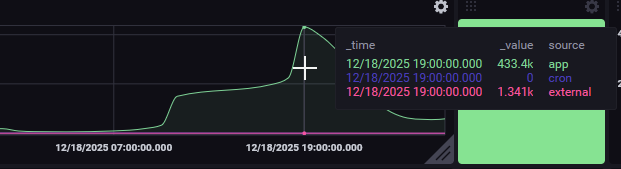
To resolve this, I stopped the background syncing process to reduce load and increased the server’s capacity to handle connections. This got users back into beestat, and if they did a fresh login, their issue was temporarily resolved.
Overnight and throughout Friday users who had logged back in began to see failures again. The app server was handling the load, but syncing was still failing.
Upon closer investigation, I found that most users were continually receiving the following response from ecobee:
{ “status”: { “code”: 1, “message”: “Authentication failed. Unexpected error. Contact support.” } }
This is a documented response, but not one that beestat was programmed to handle. With some testing, I found that I was able to successfully perform a token refresh with ecobee when receiving that message. Typically I would see code 14 – Refresh your tokens and this would happen automatically.
I quickly applied a fix to also consider this message for token refreshes. Almost immediately users were getting updated tokens and syncing again and also stopping the API polling that was creating the unwanted server load.
Here’s the fix:
I will continue to monitor as all the normal syncs get back in rhythm. Note that beestat should successfully sync data from the outage period, so nothing would be missing that is caused by this outage. If you have any questions or issues please reach out. I have also reached out to ecobee to make them aware of the API issue.
Thank you to all who reported the issue and who were patient while waiting for a fix. I work full time in corporate America and have limited time between work and family and am not always able to tend to issues as quickly as I would like. Special thank you to all who use and support beestat. Merry Christmas!
Jon
Thank you so much! It’s working for me now.
Thanks, working ok now!!
Thanks Jon. I think I speak for a lot of Beestat users when I say we appreciate both you and app.
Is beestat down again?
Working fo me with no issues.
It’s working again. Weird
It just stopped working for me right now.
Edit: now it’s working again
Where are we at now? My app is syncing old information from a set schedule rather than the “hold”my current ecobee has. I’ve deleted and redownloaded but same thing. How can I fix this? Thanks
It was not syncing to show the days (for example on 12/22 the summary was stuck on 12/20). I logged out and back in and it was working fine. Now it’s not showing data in the summary since sometime on 12/25. The days are there but the summary says my system hasn’t run since sometime on Christmas, no minutes at all for the past 4 days. I deleted the app and redownloaded it, logged back in—still not working.
Thanks
Everything should be back up and working, but if you’re seeing any lapse in data or failure to sync please reach out via email (contact@beestat.io) with your thermostat serial number and I can take a closer look at each case.